


How to Build AI Agents From Scratch in 2026

Quick Summary: Building AI agents from scratch involves creating autonomous systems that combine language models with reasoning, planning, and tool execution capabilities. The core process includes defining the agent's purpose, implementing function calling for tool integration, adding memory systems, and establishing control flows—all achievable without heavy frameworks using just API calls and basic programming. This hands-on approach provides deep understanding of agent architectures and enables customization beyond framework limitations.
Agents aren't complicated.
Strip away the hype and frameworks, and what remains is surprisingly straightforward: a language model that can decide which tools to use, execute those tools, and observe the results.
Building agents from scratch teaches something frameworks hide—the actual mechanics of how autonomous systems work. According to arXiv research, AI agents represent a paradigm shift in how intelligent systems interact with environments, moving from narrow task execution to autonomous operation across diverse domains.
Here's the thing though—most developers skip straight to frameworks like LangChain or CrewAI without understanding what happens under the hood. That creates problems when debugging, customizing, or optimizing performance.
This guide walks through building a functioning agent using only API calls and basic programming. No black boxes. Just core concepts implemented step by step.
What Makes Something an Agent
An agent is more than a chatbot that answers questions. The distinction matters.
According to OpenAI's practical guide, an AI system qualifies as an agent when it has instructions (what it should do), guardrails (what it should not do), and access to tools (what it can do) to take action on behalf of users.
The critical difference: agents can execute functions in the real world. They don't just generate text—they call APIs, query databases, perform calculations, and trigger workflows.
Research from Arizona State University (Bin Xu, 2025) identifies four core capabilities that define agent systems:
- Reasoning about which actions to take
- Planning sequences of steps toward goals
- Maintaining memory of context and past interactions
- Using external tools to extend capabilities beyond text generation
That last point—tool use—transforms a language model into an agent. When the model can decide "I need to check the weather" and actually call a weather API, autonomy emerges.
The ReAct Pattern: How Agents Think
Google released the ReAct framework back in 2022, and it remains the foundation for most modern agents.
ReAct stands for Reason + Act. The pattern is simple:
- The agent reasons about the current situation
- It acts by calling a tool or responding directly
- It observes the result
- It reasons again based on the new information
This loop continues until the agent determines it has completed the task.
The elegance lies in its simplicity. Each step builds on previous observations, allowing the agent to adapt as situations change.
But wait. How does the agent know which tools to call?
That's where function calling comes in.
Function Calling: Teaching Models to Use Tools
Function calling is the mechanism that enables tool use. Modern language models from OpenAI, Anthropic, and others support this natively.
Here's how it works:
Developers define available tools as JSON schemas. These schemas describe each function's name, purpose, and parameters. The model receives these schemas along with the user's request.
When the model determines a tool would help answer the query, it returns a structured function call instead of regular text. The application then executes that function and feeds the result back to the model.
Real talk: this isn't the model executing code. The model just decides which function to call and with what parameters. The actual execution happens in the application layer.
|
Component |
Responsibility |
Example |
|---|---|---|
|
Model Layer |
Decides which tool to use |
"I should call get_weather with city='Boston'" |
|
Application Layer |
Executes the actual function |
Makes API call to weather service |
|
Model Layer |
Processes result and responds |
"Based on the data, it's 72°F and sunny" |
This separation matters for security. The model can't execute arbitrary code—it can only request specific, pre-defined functions that developers have explicitly allowed.
Defining Tool Schemas
Tool definitions follow a standard format. Each tool needs a name, description, and parameter schema.
For a calculator tool, the schema might look like:
{
"name": "calculate",
"description": "Performs basic math operations",
"parameters": {
"type": "object",
"properties": {
"operation": {
"type": "string",
"enum": ["add", "subtract", "multiply", "divide"]
},
"num1": {"type": "number"},
"num2": {"type": "number"}
},
"required": ["operation", "num1", "num2"]
}
}
The description is critical. That's what the model uses to decide when to call the function. Vague descriptions lead to incorrect tool selection.
According to OpenAI's building agents guide, the quality of tool descriptions directly impacts agent reliability. Specific, clear descriptions improve tool selection accuracy significantly.
Step-by-Step: Building a Basic Agent
Now comes the practical part. Building an agent that can use tools requires just a few components.
Step 1: Define the Agent's Purpose
Over-scoping kills agents. Start narrow.
For this example: build an agent that can answer questions requiring both general knowledge and mathematical calculations. Two capabilities, clear boundaries.
Step 2: Implement the Tools
Create the actual functions the agent will call. Keep them simple and focused.
def calculate(operation, num1, num2):
if operation == "add":
return num1 + num2
elif operation == "subtract":
return num1 - num2
elif operation == "multiply":
return num1 * num2
elif operation == "divide":
return num1 / num2 if num2 != 0 else "Error: division by zero"
def search_knowledge(query):
# Simplified - would connect to actual knowledge base
knowledge_base = {
"capital of france": "Paris",
"boiling point of water": "100°C or 212°F"
}
return knowledge_base.get(query.lower(), "Information not found")
These functions represent the agent's capabilities. Each one extends what the agent can do beyond text generation.
Step 3: Create the Main Agent Loop
The agent loop handles the conversation flow. It sends messages to the model, checks for function calls, executes tools, and feeds results back.
The basic structure:
- Send user message and tool definitions to model
- Receive model response
- If response includes function call, execute it
- Add function result to conversation
- Send updated conversation back to model
- Repeat until model provides final answer
This loop implements the ReAct pattern automatically. The model reasons, requests actions through function calls, observes results, and continues reasoning.
Step 4: Build the System Prompt
The system prompt shapes agent behavior more than anything else. It defines personality, approach, and constraints.
According to research from the University of the Basque Country and Lebanese International University (Mohamad Abou Ali, 2025), system prompt quality represents a critical factor in agent reliability and output consistency.
A solid system prompt includes:
- Role definition (what the agent is)
- Capabilities (what tools are available)
- Constraints (what not to do)
- Response format expectations
Example: "You are a helpful assistant with access to calculation and knowledge lookup tools. Always use the appropriate tool when needed. Keep responses concise and accurate. Never make up information—use the search_knowledge tool when unsure."
That last part matters. Without explicit instructions, models sometimes hallucinate instead of using available tools.
Move From Tutorials to Production AI Agents
Learning how to build an agent is a good start, but most setups stay at the demo level and never reach real usage. OSKI Solutions works with teams that need to move past that stage and turn early prototypes into something usable. They help structure agent logic around real business cases, set up reliable data flows, and handle things like authentication, permissions, and system boundaries. This is usually where simple builds break, especially in products that already have users and operational constraints.
They also help shape how agents behave over time – monitoring, updates, and adjustments based on how people actually use them. If you’re building AI agents and want them to hold up outside a tutorial environment, contact OSKI Solutions and go through your setup.
Build AI Agents From Scratch
Learn how to design, develop, and deploy AI agents step by step—from basic logic to full autonomous systems.
Adding Memory for Context Awareness
Basic agents reset with each interaction. Memory changes that.
Memory systems range from simple to complex. The simplest approach: maintain conversation history and include it with each request.
More sophisticated memory includes:
- Short-term memory: Recent conversation context
- Long-term memory: Persistent facts about the user or domain
- Working memory: Intermediate results during multi-step tasks
According to arXiv research on agent architectures, memory integration significantly enhances agent performance in tasks requiring contextual understanding, such as in customer support systems (e.g., Vodafone's implementation handling over 70% of inquiries) or research agents building on past findings.
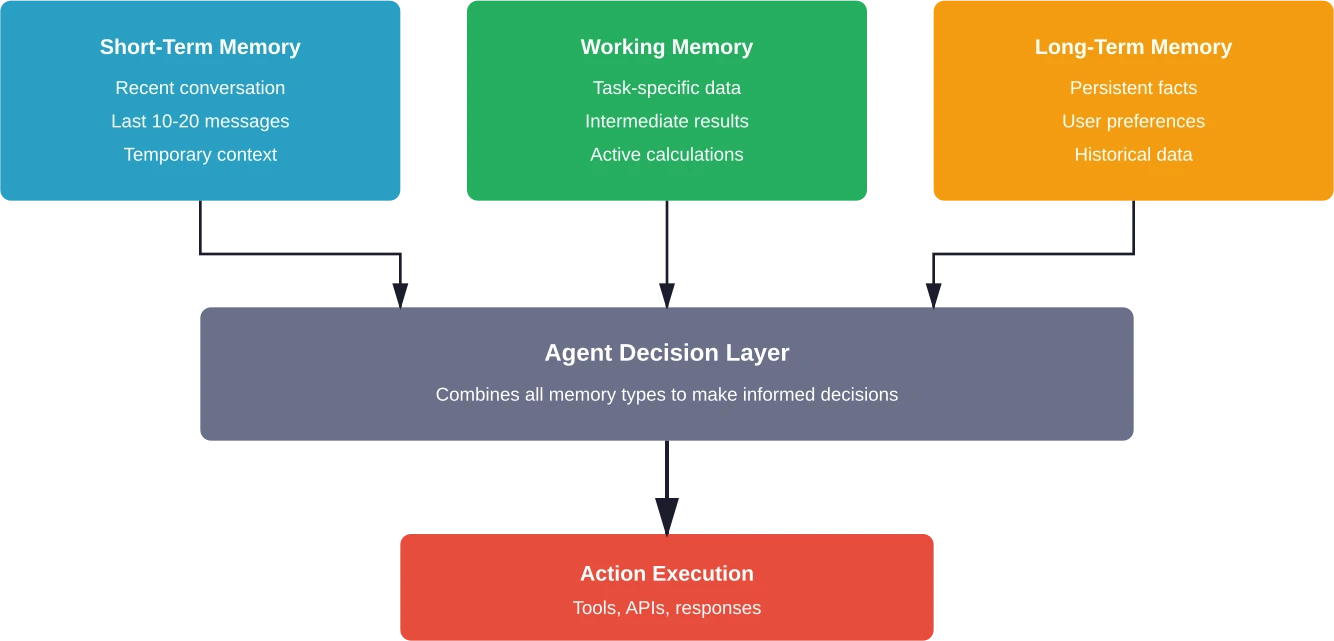
The implementation depends on requirements. For simple conversational context, append messages to an array. For persistent user data, use a database. For complex multi-step reasoning, implement a working memory store that tracks intermediate calculations.
One practical pattern: store conversation history in a sliding window. Keep the most recent N messages in full, summarize older messages, and discard ancient history. This balances context retention with token limits.
Orchestration and Control Flow
Single-agent systems handle straightforward tasks. Complex workflows need orchestration.
Orchestration means coordinating multiple agents or managing complex decision trees within one agent. According to research from Arizona State University, proper orchestration patterns enable agents to handle real-world computation beyond simple query-response interactions.
Several patterns emerge:
- Sequential workflows: Agent A completes its task, passes results to Agent B, which continues the work. Like an assembly line.
- Parallel workflows: Multiple agents work simultaneously on different subtasks, then combine results. Useful when tasks are independent.
- Hierarchical workflows: A supervisor agent delegates to specialized worker agents, aggregates their outputs, and synthesizes final results.
- Conditional workflows: The agent evaluates conditions and routes work accordingly. "If data quality is low, call the validation agent. Otherwise, proceed with analysis."
The choice depends on task complexity. Start simple—most problems don't need multi-agent orchestration.
Message Queues and Agent Communication
When agents need to coordinate, message queues provide a clean interface. Agent A publishes a message to a queue, Agent B subscribes and processes it.
This decouples agents. They don't need to know about each other—just about the message format. That makes systems more maintainable as complexity grows.
For smaller projects, direct function calls work fine. For production systems handling thousands of requests, proper message infrastructure prevents bottlenecks.
Choosing the Right Model
Not all language models work equally well for agents. The requirements differ from chat applications.
Key factors when selecting models:
|
Factor |
Why It Matters |
Considerations |
|---|---|---|
|
Function calling support |
Core agent capability |
Native support vs. prompt engineering workarounds |
|
Response speed |
Affects user experience |
Local models faster but less capable; API calls slower but more powerful |
|
Context window |
Determines memory capacity |
Larger windows allow more conversation history and tool results |
|
Reasoning capability |
Impacts tool selection accuracy |
More capable models make better decisions about when to use tools |
|
Cost |
Operational sustainability |
Token usage multiplies with agent loops—small differences compound |
According to community discussions among developers building production agents, balancing these factors requires testing. The "best" model depends on the specific use case.
For rapid prototyping: use API-based models like GPT-4 or Claude. They handle function calling natively and provide strong reasoning.
For production at scale: consider smaller models or local deployment. A well-prompted smaller model often outperforms a poorly-implemented large model, and the cost difference matters at volume.
The case study that gets cited: One development team initially using a customer support agent, was burning through 300,000+ tokens daily with 90-minute completion times. Switching to a smaller model with better prompt engineering reduced costs by 85% while improving response times.
Evaluation and Testing
Agents behave non-deterministically. That makes traditional testing approaches insufficient.
Effective agent evaluation requires systematic approaches to analyze errors and measure improvements. According to research by IKERBASQUE and the University of the Basque Country (Mohamad Abou Ali, 2025), proper evaluation frameworks are critical for agent reliability.
Key testing strategies:
- Unit testing tools: Test each function independently. Does the calculator return correct results? Does the search function retrieve expected data?
- Integration testing: Test the full agent loop. Given specific inputs, does the agent call the right tools in the right order?
- Behavioral testing: Define expected behaviors for different scenarios. "When asked about weather, must call weather API, not make up data."
- Adversarial testing: Try to break the agent. Edge cases, unusual inputs, attempts to circumvent guardrails.
- Performance benchmarks: Track token usage, response times, and success rates over time.
The most critical metric: task completion rate. Does the agent successfully complete its intended purpose?
Many teams implement continuous evaluation loops. Each agent interaction gets logged. Failed interactions are analyzed. Prompts and tool definitions get refined based on actual failure patterns.
Common Pitfalls and Solutions
Building agents from scratch reveals problems that frameworks abstract away. Knowing the common issues saves time:
- Tool selection errors: The agent calls the wrong tool or doesn't call tools when it should.
- Solution: Improve tool descriptions. Make them specific. Add examples in the system prompt showing when each tool should be used.
- Infinite loops: The agent keeps calling tools without reaching a conclusion.
- Solution: Implement maximum iteration limits. After N loops, force a response or escalate to human review.
- Context overflow: Conversation history exceeds token limits.
- Solution: Implement conversation summarization or sliding window approaches that preserve important context while discarding old messages.
- Inconsistent behavior: Same input produces different outputs.
- Solution: Lower temperature settings for more deterministic responses. Add structured output constraints. Implement output validation.
- Security vulnerabilities: Agents execute unintended actions or leak sensitive data.
- Solution: Implement strict input validation. Whitelist allowed tools. Add confirmation steps for sensitive operations. Never expose raw database queries or system commands as tools.
According to NIST's AI Agent Standards Initiative (announced February 17, 2026), establishing security and interoperability standards for agents has become a priority as adoption accelerates.
From Prototype to Production
A working prototype differs significantly from a production-ready agent. The gap includes reliability, monitoring, and scalability considerations:
- Error handling: Production agents need graceful failure modes. When tools fail or return unexpected results, the agent should recover or escalate appropriately rather than breaking.
- Logging and observability: Track every interaction. Which tools were called? What were the results? How long did execution take? This data informs optimization and debugging.
- Rate limiting and cost controls: Agents can burn through API quotas quickly. Implement rate limits, budget alerts, and circuit breakers that stop execution if costs spike unexpectedly.
- User authentication and permissions: Different users need different tool access. The agent should respect existing permission systems rather than bypassing them.
- Scalability patterns: Single-instance agents work for prototypes. Production systems need load balancing, queue management, and potentially distributed execution.
The Microsoft AI Agents for Beginners course on GitHub covers these production considerations in depth for teams moving beyond initial implementations.
Frameworks vs. From Scratch: Making the Choice
So why build from scratch if frameworks exist?
Frameworks like LangChain, CrewAI, and LlamaIndex provide valuable abstractions. They handle common patterns, reduce boilerplate, and accelerate development.
But they come with tradeoffs:
- Black box behavior when things go wrong
- Framework-specific patterns that may not fit unique requirements
- Additional dependencies and version management
- Performance overhead from abstraction layers
- Learning curve for framework-specific concepts
Building from scratch provides:
- Complete understanding of agent mechanics
- Full control over implementation decisions
- Easier debugging and optimization
- No framework lock-in
- Lighter dependency footprint
The practical answer: start from scratch for learning, then use frameworks for production when they fit requirements. Understanding core concepts makes framework usage more effective.
According to community discussions among developers, the pattern that works well involves building a simple agent from scratch first, identifying pain points, and then evaluating whether frameworks address those specific issues.
Practical Code Example: Complete Agent
Bringing it together—here's a minimal but functional agent implementation using Python and OpenAI's API:
import openai
import json
# Define available tools
tools = [
{
"type": "function",
"function": {
"name": "calculate",
"description": "Performs mathematical calculations",
"parameters": {
"type": "object",
"properties": {
"expression": {
"type": "string",
"description": "Math expression to evaluate"
}
},
"required": ["expression"]
}
}
}
]
# Tool implementations
def calculate(expression):
try:
result = eval(expression)
return str(result)
except Exception as e:
return f"Error: {str(e)}"
# Main agent loop
def run_agent(user_message):
messages = [
{"role": "system", "content": "You are a helpful assistant with access to calculation tools."},
{"role": "user", "content": user_message}
]
max_iterations = 5
for iteration in range(max_iterations):
response = openai.chat.completions.create(
model="gpt-4",
messages=messages,
tools=tools
)
message = response.choices[0].message
# If no tool calls, return final answer
if not message.tool_calls:
return message.content
# Execute tool calls
messages.append(message)
for tool_call in message.tool_calls:
function_name = tool_call.function.name
arguments = json.loads(tool_call.function.arguments)
if function_name == "calculate":
result = calculate(arguments["expression"])
messages.append({
"role": "tool",
"tool_call_id": tool_call.id,
"content": result
})
return "Maximum iterations reached"
# Test the agent
print(run_agent("What is 234 multiplied by 567?"))
This code demonstrates the core concepts: tool definitions, function calling, result processing, and loop management. It's minimal but functional.
Extensions would add error handling, logging, additional tools, and production safeguards. But the foundation remains the same.
Where to Go From Here
Understanding agent fundamentals opens doors to advanced patterns.
Next steps for deeper mastery:
- Multi-agent systems: Build specialized agents that collaborate. A research agent finds information, an analysis agent processes it, a writing agent synthesizes results.
- Advanced memory systems: Implement vector databases for semantic memory retrieval. Store embeddings of past interactions and retrieve relevant context based on similarity.
- Custom tool development: Create domain-specific tools that give agents unique capabilities. Database query tools, visualization generators, external system integrations.
- Guardrails and safety: Implement output filtering, content moderation, and action approval workflows that prevent harmful agent behavior.
- Performance optimization: Profile token usage, implement caching strategies, and optimize prompt engineering to reduce costs while maintaining quality.
The Google ADK tutorial and Anthropic's Claude Agent SDK documentation provide practical starting points for these advanced patterns.
Frequently Asked Questions
Do I need machine learning expertise to build AI agents?
No. Modern LLM APIs handle the intelligence layer. Developers focus on orchestration, tool integration, and control flow. Basic programming knowledge is sufficient.
What's the minimum code required to create a functioning agent?
A simple agent can be built in under 100 lines of code using LLM API calls, tool definitions, and a loop to process actions and results.
How do agents differ from chatbots or AI assistants?
Chatbots respond to messages, while agents take action. Agents can call APIs, execute functions, and interact with external systems to complete tasks autonomously.
Can agents run locally without cloud API dependencies?
Yes. Local models can power agents offline, offering privacy benefits, but usually with reduced reasoning capability compared to cloud-based models.
What prevents agents from executing harmful actions?
Safeguards include restricted tool access, input validation, output filtering, and human approval for sensitive actions, ensuring safe operation.
How much does it cost to run an agent in production?
Costs depend on model usage and complexity. Simple agents may cost cents per interaction, while large-scale systems require careful cost management.
What's the biggest mistake developers make when building first agents?
The most common mistake is overcomplicating the first version. Starting with a simple, focused use case leads to better results and easier scaling.
Conclusion
Building AI agents from scratch strips away the mystery around autonomous systems.
The core concepts are straightforward: models that can decide which tools to use, mechanisms for calling those tools, loops that process results, and memory systems that maintain context. Everything else is refinement.
Frameworks provide value, but understanding fundamentals makes framework usage more effective. When debugging complex agent behavior or implementing custom patterns, knowledge of underlying mechanics becomes essential.
The field moves rapidly. According to arXiv research, AI agents represent a paradigm shift in intelligent systems. NIST's Standards Initiative indicates that interoperability and security standards are actively developing. The Microsoft and OpenAI educational resources demonstrate industry investment in making agent development more accessible.
Start simple. Build a basic agent with one or two tools. Watch how it reasons and acts. Then expand capabilities based on real requirements rather than anticipated needs.
The best way to learn agents is to build them. Pick a small problem, implement a minimal solution, and iterate from there. The knowledge gained from that hands-on experience exceeds any framework documentation.


