

How Much Does It Cost to Integrate Salesforce CRM? A Full Breakdown

Integrating Salesforce CRM often sounds simpler than it is. On paper, it’s “just” connecting systems, syncing data, and automating workflows. In reality, integration work is where most Salesforce projects quietly grow in scope, time, and cost.
The price of Salesforce CRM integration depends far less on the platform itself and far more on what you are connecting, how clean your data is, and how much reliability you expect once the system goes live. A basic integration can be measured in days. A production-ready setup that handles edge cases, failures, security rules, and long-term maintenance can stretch into weeks or months.
This article breaks down what Salesforce CRM integration actually costs, where the money usually goes, and why two companies using the same CRM can end up with very different budgets.
Typical Salesforce CRM Integration Cost Ranges
Based on current market rates and real-world projects, Salesforce CRM integration costs generally fall into the following ranges:
- Basic integrations: $5,000 to $15,000
- Moderate complexity integrations: $20,000 to $60,000
- Advanced or multi-system integrations: $70,000 to $150,000+
These numbers reflect integration work only. They do not include Salesforce license fees, major CRM customization, or long-term managed support.
The wide range exists because integration scope varies dramatically from one business to another.
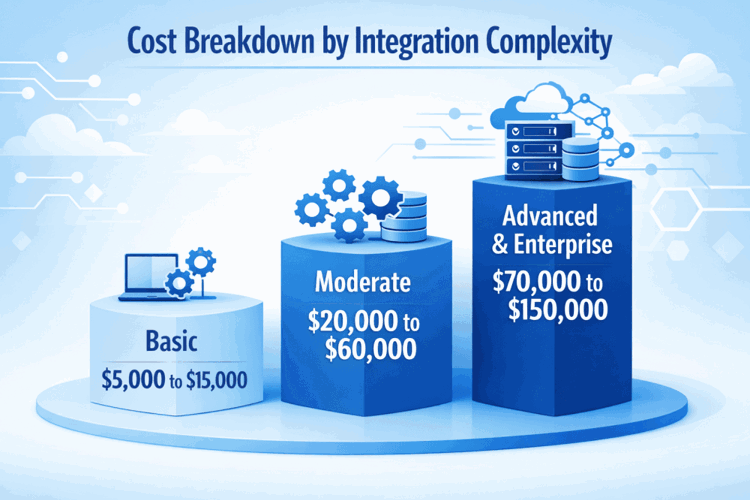
Cost Breakdown by Integration Complexity
Basic Salesforce CRM Integrations
Basic integrations usually involve one or two systems with relatively clean data and straightforward logic.
Common Examples
- Syncing contacts and leads from a marketing platform
- Connecting Salesforce to an accounting tool for invoices
- Simple API-based data exchange without heavy transformation
Typical Characteristics
- Limited number of objects
- Standard field mappings
- Minimal custom logic
- Low data volume
- Few edge cases
Cost Range
$5,000 to $15,000
Timeline
1 to 3 weeks
These projects are often handled by freelancers or small consulting teams. They work well when expectations are clear and the business processes are already stable.
Moderate Salesforce CRM Integrations
Moderate integrations are the most common and where many teams underestimate cost.
Examples
- Salesforce connected to ERP and marketing tools
- Bidirectional data sync with validation rules
- Custom workflows triggered by external events
- Scheduled and real-time data synchronization
Typical Characteristics
- Multiple objects and relationships
- Data transformation and cleansing
- Error handling and retries
- Security and permission rules
- Testing across multiple scenarios
Cost Range
$20,000 to $60,000
Timeline
4 to 8 weeks
This is where integration stops being plug-and-play. Architecture decisions start to matter, especially if the system needs to scale or support future changes.
Advanced and Enterprise Salesforce Integrations
Advanced integrations usually involve multiple systems, high data volume, strict reliability requirements, or regulated environments.
Examples
- Salesforce integrated with ERP, data warehouse, and support systems
- Custom middleware or integration platforms
- Complex business rules and automation
- High availability and monitoring requirements
- Industry-specific compliance constraints
Typical Characteristics
- Large datasets and frequent syncs
- Complex object relationships
- Custom APIs and middleware
- Advanced logging and alerting
- Long-term scalability planning
Cost Range
$70,000 to $150,000+
Timeline
2 to 4 months or longer
These projects are usually handled by certified Salesforce partners or experienced integration teams, not individual freelancers.

Salesforce CRM Integration, Done Right With OSKI
At OSKI, we see Salesforce CRM integration as more than a technical task. For us, it is about making systems work together in a way that actually supports the business day to day, not just on launch day. We focus on integrations that are stable, predictable, and easy to live with long after the first sync runs successfully.
We work with Salesforce as part of a broader technology stack. That includes cloud platforms like AWS, Azure, and Google Cloud, backend systems built on .NET and Node.js, and modern frontend frameworks such as React, Vue, and Angular. This background allows us to design integrations that fit naturally into existing environments instead of forcing Salesforce to operate in isolation.
Our approach is practical and engineering-led. We spend time understanding data flows, edge cases, and future growth before writing code. The goal is to avoid fragile connections that break with every small change. Whether it is a straightforward Salesforce integration or a more complex setup involving multiple systems, we focus on solutions that scale, stay secure, and keep teams confident in the data they rely on every day.
Streamline Your Sales with the Right CRM
Centralize your leads, automate follow-ups, and close more deals with a CRM tailored to your business.
Key Cost Drivers in Salesforce CRM Integration
Number of Systems Being Integrated
Each additional system increases integration complexity exponentially, not in a straight line. Even a single external system usually requires authentication setup, API configuration, data mapping, and proper error handling. When you move from one system to two or three, that work multiplies. Dependencies appear between systems, testing becomes more involved, and ongoing maintenance grows heavier. More connected platforms almost always mean more time, more coordination, and higher cost.
Data Volume and Data Quality
Clean data is inexpensive to integrate. Messy data is not. Many Salesforce integration projects run into issues with duplicate records, inconsistent formats, missing required fields, or conflicting values across systems. Before integration can work reliably, data often needs to be cleaned, normalized, and validated. This step is frequently underestimated during planning, yet it can add thousands to the overall budget if discovered late.
Real-Time vs Batch Integration
Real-time integrations are more expensive than scheduled batch updates. Systems that exchange data instantly must handle immediate responses, recover gracefully from errors, meet higher performance expectations, and undergo more rigorous testing under load. Batch integrations, which run on schedules, are simpler and cheaper to build. However, they may not meet business requirements when teams rely on up-to-date data inside Salesforce throughout the day.
Custom Logic and Automation
Out-of-the-box data mappings are relatively inexpensive. Custom logic is where costs rise. Conditional workflows, complex field transformations, business rules that depend on multiple systems, and exception handling all require additional development and testing. Every rule added to an integration increases not only initial build cost but also long-term maintenance effort as business processes evolve.
Integration Method and Architecture
Salesforce integrations can be built using native Salesforce APIs, AppExchange connectors, middleware platforms, or fully custom integration layers. Simple API-based integrations usually cost less upfront. Middleware solutions typically require higher initial investment but can reduce complexity and risk over time, especially when many systems are involved. Architecture decisions made early in the project directly affect cost, scalability, and maintenance both now and in the future.
Salesforce Integration Tools and Their Cost Impact
Salesforce CRM integrations can be built in several different ways, and the technical approach you choose has a direct impact on both cost and long-term maintainability. Some teams rely on custom-built integrations using Salesforce APIs, others use pre-built connectors from the AppExchange, and more complex environments often introduce middleware platforms to manage data flow at scale.
Each option comes with its own trade-offs. What looks cheaper at the start may become expensive to maintain, while a higher upfront investment can reduce complexity and risk over time. The table below compares the most common Salesforce integration approaches and how they typically affect project costs.
|
Integration Approach |
How It’s Used |
Advantages |
Trade-Offs |
Typical Cost Impact |
|
Native Salesforce APIs |
Custom integrations built directly using Salesforce REST or SOAP APIs |
Full control over data flow and logic, no additional licensing fees, flexible implementation tailored to business needs |
Requires experienced developers, higher maintenance responsibility, greater risk if architecture is poorly designed |
Medium to high, depending on integration complexity |
|
AppExchange Connectors |
Pre-built connectors for common platforms and services |
Faster setup, lower upfront development cost, vendor-supported solutions |
Limited customization, ongoing subscription fees, dependency on third-party vendors |
Lower initial cost, higher long-term cost due to licensing |
|
Middleware and Integration Platforms |
Platforms like MuleSoft, Boomi, or Workato acting as a central integration layer |
Centralized logic, easier scaling, better monitoring and error handling |
Platform licensing fees, added setup complexity, need for skilled integration architects |
Higher upfront cost, often lower long-term complexity and risk |
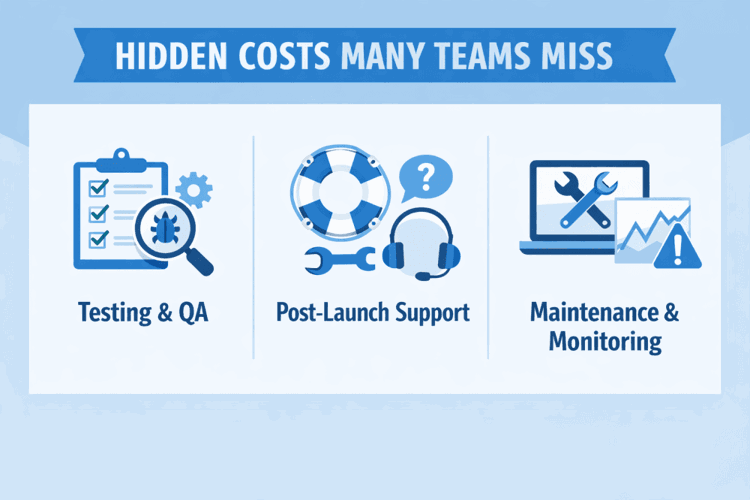
Hidden Costs Many Teams Miss
1. Testing and QA
Integration testing is not optional, and it always takes more time than teams expect. Beyond simply checking whether data moves from one system to another, testing involves validating data accuracy, simulating failure scenarios, running performance and load tests, and confirming that the integration behaves correctly from a user’s perspective. Skipping or rushing this stage may reduce short-term costs, but it almost always leads to larger expenses later when issues surface in production.
2. Post-Launch Support
Integrations rarely work perfectly on day one. Once real users start interacting with Salesforce, small issues begin to appear. Post-launch support typically covers bug fixes, performance tuning, adjustments based on real-world usage, and refinements driven by user feedback. Depending on the complexity of the integration, initial post-launch support can cost anywhere from $5,000 to $30,000 and should be planned as part of the overall budget, not treated as an afterthought.
3. Maintenance and Monitoring
Integrations are living systems, not one-time projects. Ongoing costs come from API version updates, changes in third-party systems, monitoring and alerting, and minor enhancements as business processes evolve. Over time, these activities add up. Annual maintenance costs often range from 15 to 25 percent of the original integration investment, especially in environments where Salesforce plays a central role in daily operations.
How Long Salesforce CRM Integration Takes
The timeline for Salesforce CRM integration depends largely on scope, system complexity, and how well requirements are defined at the start. Some projects move quickly with minimal disruption, while others take longer because integration work often reveals hidden dependencies or data issues that were not obvious during planning.
In general, timelines tend to fall into the following ranges:
- Simple integrations: 1 to 3 weeks. These usually involve one external system, limited data volume, and standard mappings with little custom logic.
- Moderate integrations: 1 to 2 months. These projects often include multiple systems, bidirectional data flow, data transformation, and more thorough testing.
- Complex integrations: 2 to 4 months or longer. Large environments with real-time syncing, high data volumes, or compliance requirements need additional time for architecture design, testing, and stabilization.
Delays most often come from unclear or changing requirements, poor data quality that requires cleanup mid-project, or late scope changes once users start seeing the system in action. Careful planning and realistic timelines help reduce these risks, but some adjustment is almost always part of the process.
When It Makes Sense to Invest More
Spending more on Salesforce CRM integration is justified when data accuracy directly affects business decisions. If sales forecasts, billing, or customer records depend on reliable, up-to-date information, cutting corners on integration often creates more problems than it solves.
Higher investment is also reasonable when systems must stay in sync in real time. Real-time integrations require stronger architecture, better error handling, and more testing, all of which increase cost but reduce operational risk. This is especially true in environments where Salesforce drives daily sales, service, or fulfillment activities.
Compliance and security requirements are another common reason budgets grow. Regulated industries and revenue-critical operations cannot afford data loss, inconsistent records, or system downtime. In these cases, cheaper integrations tend to become expensive failures over time, while a well-built integration pays for itself through stability and trust.
Final Thoughts
So, how much does it cost to integrate Salesforce CRM? In most real-world scenarios, simple integrations tend to start around $5,000, while typical business integrations often fall in the $20,000 to $60,000 range. More complex, multi-system environments frequently exceed $100,000 once architecture, testing, and long-term reliability are taken into account.
Salesforce itself is rarely the most expensive part of the equation. Integration costs are driven by complexity, data quality, and expectations around stability and accuracy. The smartest teams treat integration as infrastructure rather than a one-time task. By budgeting realistically, designing carefully, and planning for change, they spend more upfront and avoid much larger costs later.
Frequently Asked Questions
How much does Salesforce CRM integration usually cost?
In most cases, Salesforce CRM integration costs range from $5,000 to $60,000. Simple integrations with one external system sit at the lower end, while more typical business setups with multiple systems often land between $20,000 and $60,000. Complex, enterprise-level integrations can exceed $100,000 when scalability, reliability, and long-term maintenance are factored in.
Why do Salesforce integration costs vary so much?
Costs vary because no two integration projects are the same. The number of systems involved, data quality, real-time requirements, custom logic, and compliance needs all affect effort. Two companies using the same Salesforce edition can end up with very different budgets depending on how Salesforce fits into their operations.
Is Salesforce integration more expensive than Salesforce implementation?
It can be. Salesforce licenses and basic setup are often predictable, while integration work introduces uncertainty. Data cleanup, custom workflows, testing, and error handling frequently add more cost than teams expect. In many projects, integration ends up costing more than the initial CRM configuration.
Can we integrate Salesforce without using a consulting partner?
Yes, especially for simple integrations. Internal teams or freelancers can handle basic API connections if requirements are clear and data is clean. However, as complexity increases, the risk of fragile integrations grows. Many teams bring in experienced partners once multiple systems, real-time syncing, or compliance requirements are involved.
How long does Salesforce CRM integration take?
Timelines depend on scope. Simple integrations often take 1 to 3 weeks. Moderate integrations usually require 1 to 2 months. Complex, multi-system integrations can take 2 to 4 months or longer. Delays most often come from unclear requirements, unexpected data issues, or late changes in scope.


