


Digital Transformation in Smart Manufacturing: 2026 Guide
Quick Summary: Copilot AI agents are specialized AI tools that automate business processes, analyze data, and execute multi-step tasks within Microsoft's ecosystem. Built through Microsoft Copilot Studio or available as pre-built solutions, these agents extend Copilot's capabilities by connecting to organizational data, automating workflows, and handling everything from customer service to financial operations—transforming how businesses operate at scale.
The shift from passive AI assistants to proactive agents marks a fundamental change in enterprise technology. Copilot AI agents don't just answer questions—they execute.
These specialized tools handle multi-step workflows, make decisions based on organizational data, and operate with minimal human intervention. The difference between traditional Copilot interactions and agent-driven automation? One gives suggestions. The other takes action.
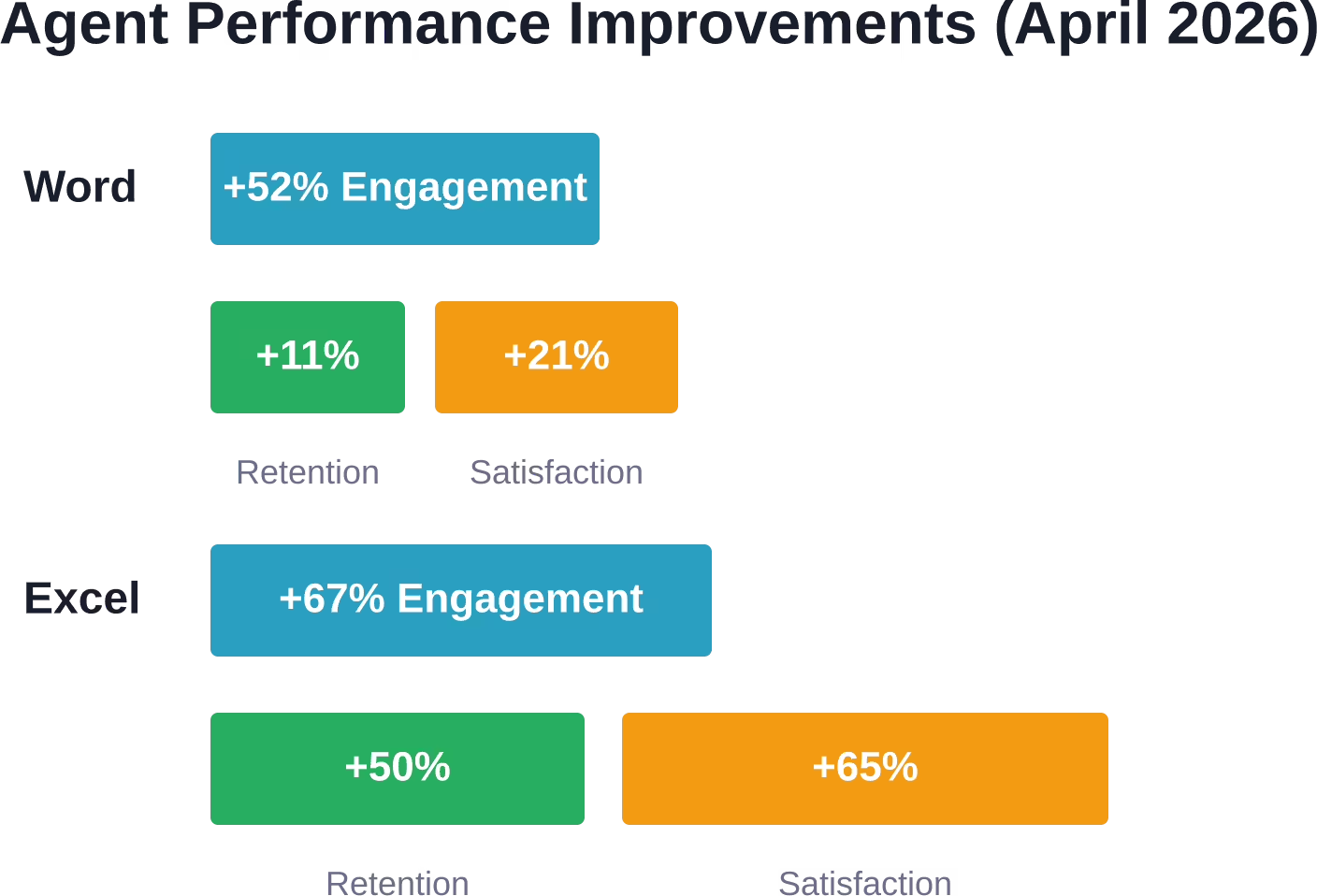
Organizations deploying these agents report measurable gains. According to official Microsoft data published April 23, 2026, agentic capabilities in Excel drove a 67% increase in engagement and a 65% boost in satisfaction ratings. Word saw 52% higher engagement, while PowerPoint users showed 36% better retention rates.
But here's the thing—building effective agents requires understanding what they are, how they work, and where they fit in your operations.
What Are Copilot AI Agents
A copilot is an AI-powered assistant that provides support, insights, and productivity boosts. Agents are something different.
Agents are specialized AI tools built to handle specific processes or solve defined business challenges. Think of agents as the apps of the AI era, with the copilot serving as the interface.
According to official Microsoft documentation, agents extend what Copilot can do by connecting to organizational knowledge bases, automating business processes, and executing tasks that would typically require human intervention.
The Copilot-Agent Relationship
The architecture works like this: Copilot provides the conversational interface and general intelligence. Agents bring specialized capabilities, domain expertise, and the ability to take action.
When someone asks Copilot to analyze quarterly sales trends, summarize a meeting, or draft a proposal, they're using Copilot's core functions. When they need to automatically route customer inquiries, update inventory across systems, or trigger approval workflows, agents handle the execution.
These AI-driven agents perform tasks alongside users—offering suggestions, automating repetitive work, and providing insights for informed decisions.
Core Capabilities
What can agents actually do? The scope includes:
Task automation across multiple systems
Data analysis with context from organizational sources
Decision-making based on predefined rules and learned patterns
Adaptability to changing business conditions
Integration with existing enterprise applications
Real talk: agents aren't replacing human judgment. They're handling the repetitive, time-consuming processes that drain productivity.

Connect AI Agents to Business Tools With OSKI
OSKI builds custom software, AI features, and system integrations. Their team can connect AI agents with existing platforms, databases, APIs, and cloud services so the agent can support a real workflow instead of working as a separate demo.
Need AI Agents Connected to Your Systems?
OSKI can help with:
developing AI and LLM features
building backend logic for agents
connecting APIs and third-party tools
integrating AI into existing software
?? Contact OSKI to discuss your project.
Supercharge Workflows with Copilot AI Agents
Transform how your team operates. Deploy autonomous Copilot agents to seamlessly handle complex tasks, orchestrate workflows across Microsoft 365, and automate your daily routines. Contact us to build your first AI digital coworker.
Types of Copilot AI Agents
Not all agents are built the same. The type determines the use case, deployment complexity, and expected outcomes.
Pre-Built Agents
Microsoft offers ready-to-deploy agents designed for common business scenarios. These require minimal configuration and integrate directly with Microsoft 365 apps.
Common examples include agents for meeting summarization, document generation, data extraction from forms, and basic workflow automation. Organizations can activate these agents and start using them immediately.
The advantage? Speed. No development required. The limitation? Less customization for unique business processes.
Custom Declarative Agents
These agents are built using Microsoft Copilot Studio, a low-code environment that lets teams create AI-driven solutions without extensive programming knowledge.
Declarative agents follow instructions, connect to specified data sources, and execute defined actions. Teams configure the agent's behavior through natural language instructions, knowledge base connections, and workflow definitions.
According to official documentation, organizations can quickly build agents that integrate public websites as knowledge sources, connect to internal databases, and trigger actions across enterprise systems.
Autonomous Agents
The most advanced category. Autonomous agents operate with greater independence, making decisions based on learned patterns, contextual awareness, and real-time data.
These agents don't just follow scripts—they adapt. In supply chain management, autonomous agents can predict disruptions, reroute shipments, and adjust inventory levels without waiting for human approval.
In sales operations, they identify high-potential leads through predictive analytics, prioritize outreach, and even draft personalized communications based on customer data patterns.
Domain-Specific Agents
Built for specialized functions within specific departments or industries. Finance agents handle expense processing, budget analysis, and compliance checks. Customer service agents manage ticket routing, sentiment analysis, and response generation.
Domain-specific agents show higher task completion rates when properly benchmarked for safety and effectiveness in real-world scenarios.
Building Agents with Microsoft Copilot Studio
Microsoft Copilot Studio provides the primary platform for creating custom agents. The environment is designed for citizen developers—people with business domain expertise but not necessarily deep coding skills.
Getting Started
The process begins with defining what the agent should do. Specific use cases work better than broad mandates. "Automate customer inquiry routing based on sentiment and topic" beats "help with customer service."
Copilot Studio uses generative AI to accelerate development. Teams can describe the agent's purpose in natural language, and the platform generates initial configurations, suggests relevant data connections, and proposes workflow structures.
Knowledge Integration
Agents need context. Copilot Studio allows connections to multiple knowledge sources:
Public websites for general information
SharePoint sites for internal documentation
Microsoft Dataverse for structured business data
Custom databases and APIs for specialized information
The platform creates a unified knowledge layer that agents query when processing requests or making decisions.
Training and Testing
Building an agent isn't a one-shot process. Teams iteratively refine the agent's behavior through testing cycles.
Copilot Studio provides simulation environments where developers can test agent responses, workflow execution, and error handling before deployment. Official training courses walk through the complete development lifecycle.
Real-world testing with limited user groups helps identify edge cases and refinement opportunities. Organizations should plan for multiple iterations before broad rollout.
Governance and Security
According to Microsoft's internal deployment guide published on January 29, 2026, proper governance is critical. Organizations need tenant strategies that separate development, testing, and production environments.
Security defaults protect business data, but teams must configure access controls, audit logging, and compliance policies specific to their requirements. The platform makes products secure by default, but organizations must apply their own policies on top.
Real-World Performance Data
The numbers tell the story. When Microsoft rolled out agentic capabilities as the default experience across Microsoft 365 in April 2026, engagement metrics jumped significantly.
Excel users showed the strongest response—67% more tries per user per week compared to the previous non-agentic experience. Satisfaction ratings (measured by thumbs-up feedback) increased 65%, while new user retention climbed 50%.
Word users engaged 52% more frequently, with satisfaction up 21% and retention up 11%. PowerPoint saw an 11% increase in engagement, 25% higher satisfaction, and 36% better retention among new users.
These aren't marginal improvements. They represent fundamental shifts in how people interact with productivity tools when agents can execute multi-step, app-native actions instead of just offering suggestions.
ROI Projections
According to data from a Microsoft-commissioned Forrester study examining global enterprises, organizations experienced measurable increases in efficiency and productivity. Results projected over a three-year period show:
Payback periods of approximately 10 months
Over 100% ROI in three years
More than 20% acceleration in new employee onboarding
8+ hours saved per user per month
The short answer? Agents deliver returns when deployed against well-defined business processes with measurable outcomes.
Enterprise Deployment Considerations
Rolling out agents at scale requires more than technical implementation. Microsoft's internal deployment to over 300,000 employees and vendors provides a roadmap.
The Five-Chapter Approach
Microsoft's deployment guide, published on January 29, 2026, structures the rollout in five stages:
Chapter One: Strategy. Define AI maturity goals and create a tenant-wide governance framework. Separate environments for development, testing, and production prevent chaos.
Chapter Two: Preparation. Assess data readiness, establish security policies, and configure compliance controls. According to the guide, proper preparation prevents most deployment issues.
Chapter Three: Pilot. Deploy to limited user groups with specific use cases. Gather feedback, measure performance against baseline metrics, and refine based on real-world usage.
Chapter Four: Scale. Expand deployment across departments while maintaining governance controls. Monitor adoption patterns and address friction points quickly.
Chapter Five: Optimization. Continuously improve agent performance, expand use cases, and develop organization-specific agents that address unique business challenges.
Licensing and Pricing
According to official pricing information, Microsoft 365 Copilot is available as an add-on to qualifying Microsoft 365 subscriptions. Specific pricing details should be verified on the official Microsoft pricing page.
Organizations need to evaluate which users will benefit most from full Copilot licenses versus those who can use basic Copilot Chat capabilities available at no additional cost with eligible Microsoft 365 subscriptions.
Agent development through Copilot Studio may involve licensing considerations. Check official Microsoft documentation for current licensing requirements specific to agent deployment scenarios.
Extensibility and Integration
For independent software vendors and organizations with custom applications, Microsoft 365 Copilot offers an extensibility framework. Agents can be packaged and published to the agent store, making them discoverable within the Copilot experience.
According to guidance published on March 31, 2026, ISVs can integrate products with Copilot and distribute agents through Microsoft 365. The agent store serves as both an extensibility option and a distribution channel.
This opens possibilities for specialized industry solutions, department-specific tools, and custom integrations that extend Copilot's capabilities beyond out-of-box functionality.
Practical Use Cases Across Industries
Agents work best when applied to specific, repeatable business processes. Here's where organizations are seeing returns.
Customer Service Operations
Agents handle tier-one inquiries, route complex issues to appropriate specialists, and provide support staff with contextual information drawn from knowledge bases and customer history.
Sentiment analysis helps prioritize urgent or frustrated customers. Automated responses handle common questions while escalation workflows ensure human attention when needed.
Financial Operations
In finance and operations apps, Copilot capabilities include generative help and guidance, workflow history summaries, and context-aware assistance. Users get AI-generated summaries of workflow histories they're viewing, reducing time spent understanding process status.
Expense processing, invoice matching, budget variance analysis, and compliance documentation all benefit from agent automation. The repetitive, rule-based nature of financial processes makes them ideal agent candidates.
Sales and Lead Management
Predictive analytics agents identify high-potential leads by analyzing customer data patterns, engagement history, and buying signals. Sales teams focus on the most promising opportunities instead of manually qualifying every lead.
Agents can draft personalized outreach, schedule follow-ups, and update CRM systems based on interaction outcomes. The result? Sales reps spend more time selling and less time on administrative tasks.
Supply Chain and Inventory
Autonomous agents monitor inventory levels, predict demand fluctuations, and trigger reorder workflows automatically. In supply chain management, they can identify potential disruptions, suggest alternative routing, and adjust delivery schedules.
The adaptive nature of advanced agents allows them to learn from historical patterns and improve decision-making over time.
Human Resources
Onboarding agents guide new employees through documentation, training modules, and system access requests. According to Microsoft's ROI data, organizations see over 20% faster onboarding times.
Agents also assist with routine HR inquiries about policies, benefits, and procedures—freeing HR staff for more complex employee relations work.
Challenges and Limitations
Agents aren't magic. Understanding limitations helps set realistic expectations.
Data Quality Dependencies
Agents are only as good as the data they access. Incomplete, outdated, or inconsistent data sources produce unreliable agent behavior.
Organizations must invest in data quality initiatives before expecting agents to deliver consistent results. Garbage in, garbage out applies fully to AI agents.
The Transparency Problem
Research from academic institutions examining AI coding agents highlights transparency and explainability challenges. When agents make decisions or take actions, understanding the reasoning matters.
Organizations need audit trails, explainability features, and human oversight mechanisms—especially for agents handling sensitive processes like financial transactions or customer communications.
Integration Complexity
While pre-built agents deploy quickly, custom agents connecting to multiple enterprise systems face integration challenges. Legacy systems without modern APIs require additional development work.
Organizations should start with well-documented, API-enabled systems before tackling complex legacy integrations.
Change Management
Technical deployment is often easier than organizational adoption. Employees may resist automation, fear job displacement, or simply continue using familiar manual processes.
Successful deployments include comprehensive change management—communication about how agents augment rather than replace human work, training on new workflows, and clear messaging about the value agents bring.
The Future of Agentic AI
Where is this heading? Several trends are shaping the next phase.
Multi-Agent Orchestration
According to arXiv research on Agentic Meta-Orchestrators for Multi-task Copilots, multiple specialized agents can work together on complex scenarios. Instead of a single agent handling everything, orchestration layers coordinate specialist agents—each optimized for specific domains.
This architectural approach allows more sophisticated problem-solving while maintaining manageable complexity for individual agent development.
Standards Development
The National Institute of Standards and Technology launched an AI Agent Standards Initiative, with announcement published on 2026-02-17 to ensure trusted, interoperable, and secure agentic systems. IEEE has active projects defining frameworks for proactive AI agents, benchmarking performance metrics, and establishing capability requirements.
As standards mature, expect greater interoperability between agent platforms and clearer evaluation frameworks for agent performance and safety.
Industry-Specific Agents
Domain-specific agents tailored for healthcare, manufacturing, legal services, and other specialized fields are emerging. These agents incorporate industry-specific compliance requirements, terminology, and workflows.
According to research on SmartPilot, a multiagent copilot for manufacturing, the system achieved 93% accuracy in predicting anomalies regarding missing parts in rocket assembly use cases. These specialized applications show the potential when agents are purpose-built for particular domains.
Enhanced Autonomy
Current autonomous agents still operate within defined guardrails. Future generations will likely handle increasingly complex decision-making with less human intervention—though oversight and governance will remain critical.
The balance between autonomy and control will continue evolving as organizations gain confidence in agent reliability and as technologies improve.
Getting Started: First Steps
Ready to deploy agents? Start here.
Assess Current State
Identify repetitive, rule-based processes that consume significant time. Look for tasks with clear inputs, defined logic, and measurable outputs. These make ideal initial agent candidates.
Evaluate data readiness. Can agents access the information needed to perform the task? Is that data accurate and current?
Start Small
Don't attempt to automate everything at once. Choose one well-defined use case, build a pilot agent, test with a limited user group, and measure results.
Small wins build organizational confidence and provide learning before tackling more complex implementations.
Invest in Training
Microsoft offers training courses specifically for Copilot Studio and agent development. These courses cover the fundamentals, provide hands-on experience, and teach best practices based on real-world deployments.
Organizations should develop internal expertise rather than relying entirely on external consultants—especially for ongoing optimization and new use case development.
Establish Governance Early
Don't wait until agents proliferate across the organization to think about governance. Define policies for agent development, data access, approval workflows, and performance monitoring from the start.
According to Microsoft's internal guidance, having an all-up tenant strategy and creating separate Power Platform environments based on what people want to build prevents governance headaches later.
Moving Forward with Copilot AI Agents
The transition from AI assistants to AI agents represents a shift from suggestion to execution. Organizations that embrace this evolution strategically—starting with clear use cases, investing in proper governance, and learning through iterative deployment—position themselves to capture real productivity gains.
The data shows engagement, satisfaction, and retention improvements when agentic capabilities become part of daily workflows. But here's what matters more: agents free people to focus on work that requires human judgment, creativity, and relationship-building.
That's the real value proposition. Not replacing human capability, but redirecting it toward higher-impact activities while agents handle the repetitive processes that drain productivity.
Start with one process. Build one agent. Measure the results. Then expand from there.
The tools exist. The platform is ready. The question is whether organizations will move quickly enough to capture competitive advantages before agentic AI becomes table stakes.
Frequently Asked Questions
What's the difference between Copilot and an AI agent?
Copilot is an AI-powered assistant that provides conversational support, insights, and productivity features. AI agents are specialized tools that execute specific business processes and automate tasks. Think of Copilot as the interface and agents as specialized apps that handle particular jobs. Agents extend Copilot's capabilities by connecting to organizational data and automating workflows.
Do I need coding skills to build Copilot AI agents?
Not necessarily. Microsoft Copilot Studio is designed as a low-code environment where citizen developers can create agents using natural language instructions and visual configuration tools. Basic agents require no programming. More complex agents with custom integrations may benefit from development expertise, but many organizations successfully build useful agents without dedicated programmers.
How much does it cost to deploy Copilot AI agents?
According to official pricing information, Microsoft 365 Copilot is available as an add-on to qualifying Microsoft 365 subscriptions. Specific pricing details should be verified on the official Microsoft pricing page. A qualifying Microsoft 365 subscription is required. Agent development through Copilot Studio may involve licensing considerations. Organizations should evaluate which users need full Copilot licenses versus basic Copilot Chat capabilities included with eligible Microsoft 365 subscriptions at no additional cost.
Can agents access sensitive business data securely?
Yes, when properly configured. Agents operate within Microsoft's security framework and respect existing access controls. Organizations must configure appropriate permissions, audit logging, and compliance policies. According to Microsoft's deployment guidance, the platform is secure by default, but organizations need to apply their specific governance requirements. Proper configuration ensures agents only access data users are authorized to see.
What types of tasks are best suited for AI agents?
Agents excel at repetitive, rule-based processes with clear inputs and defined logic. Ideal tasks include data extraction and routing, workflow automation, document generation from templates, inquiry classification and routing, basic analysis and reporting, and multi-step processes that follow consistent patterns. Tasks requiring nuanced human judgment, creative problem-solving, or complex stakeholder negotiation remain better suited for human handling.
How long does it take to see ROI from Copilot AI agents?
According to Microsoft-commissioned research examining enterprise deployments, organizations typically see payback periods around 10 months, with projected ROI exceeding 100% over three years. Early results include time savings of 8+ hours per user per month and over 20% faster new employee onboarding. Actual timelines depend on implementation scope, process complexity, and organizational readiness. Starting with well-defined pilot use cases accelerates time to value.
Are there industry standards for AI agent performance and safety?
Standards are actively developing. NIST launched an AI Agent Standards Initiative with announcement published on 2026-02-17 focused on trust, interoperability, and security. IEEE has multiple active projects defining benchmarking frameworks, performance metrics, and capability requirements for AI agents. While standards are maturing, organizations should establish their own performance criteria and safety protocols for deployed agents.


